The problem
Booking, reminders, records, feedback and follow-up calls take up a lot of clinic staff time, and steps that rely on memory get missed.
Who has this problem
Dental clinic owners, receptionists and practice managers.
How it works
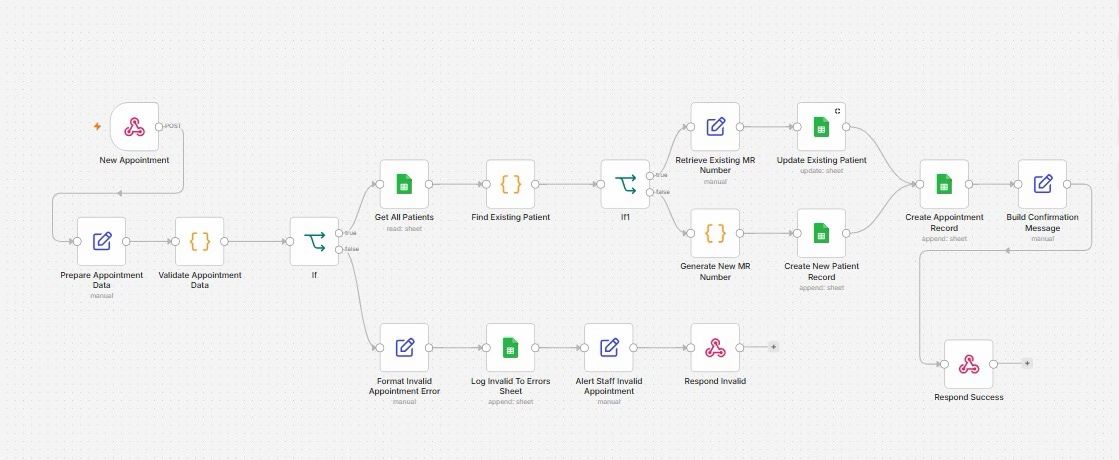
- A patient books. The system checks the details, finds the patient's existing record or creates a new one with a patient number, and saves the appointment.
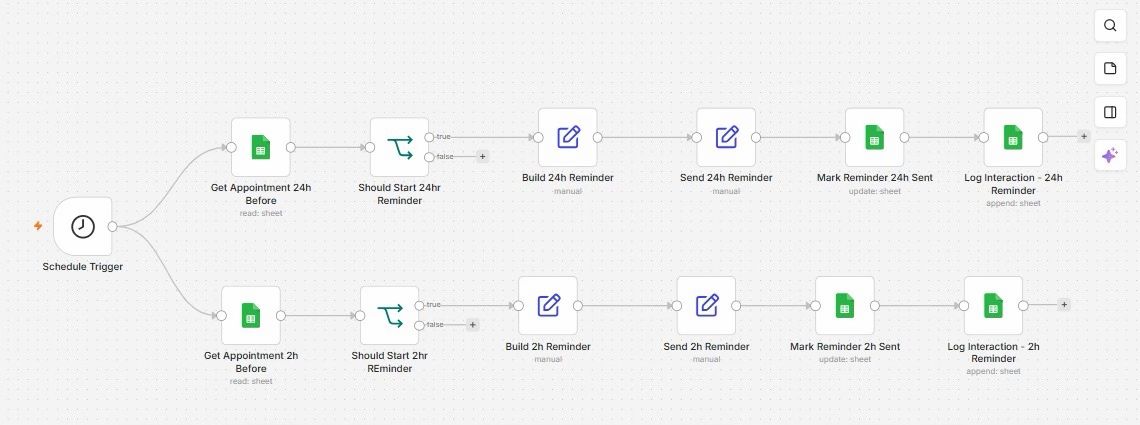
- A day before, and again two hours before, a reminder is prepared for the patient.
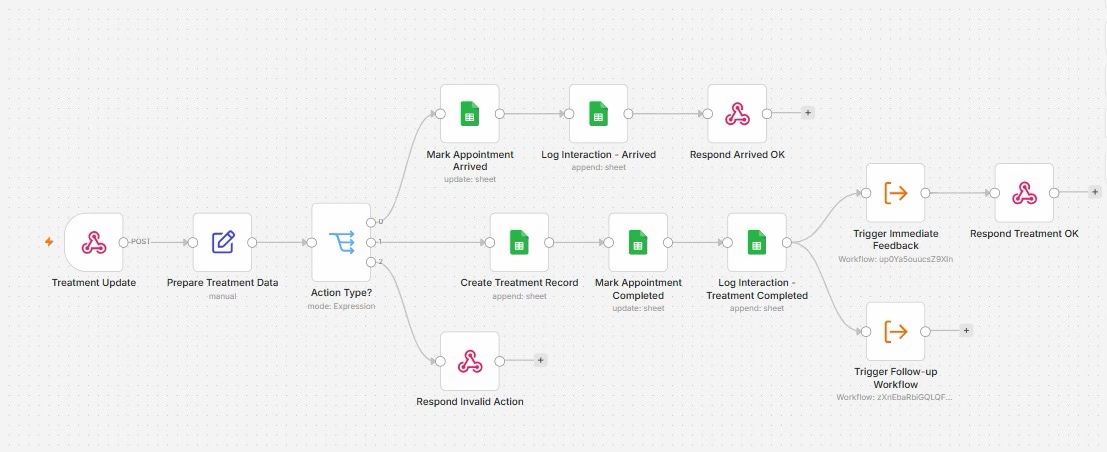
- When staff mark the treatment as complete, it is added to the patient's record.
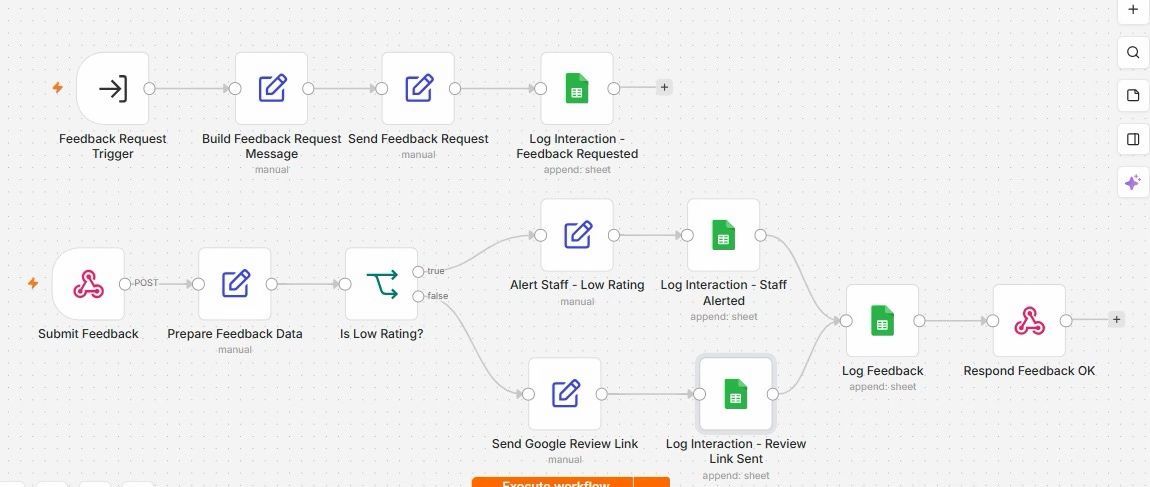
- The patient is asked for feedback. Low ratings go to staff, and satisfied patients get a link to leave a Google review.
- Later, a follow-up message is prepared for the treatment, and a call task is created for staff when one is needed.
The real workflow
Screenshots of the 5 workflows in n8n, the automation tool I build with, as shared on LinkedIn. Select one to open it full size.
 (opens full size in a new tab)
 (opens full size in a new tab)
 (opens full size in a new tab)
 (opens full size in a new tab)
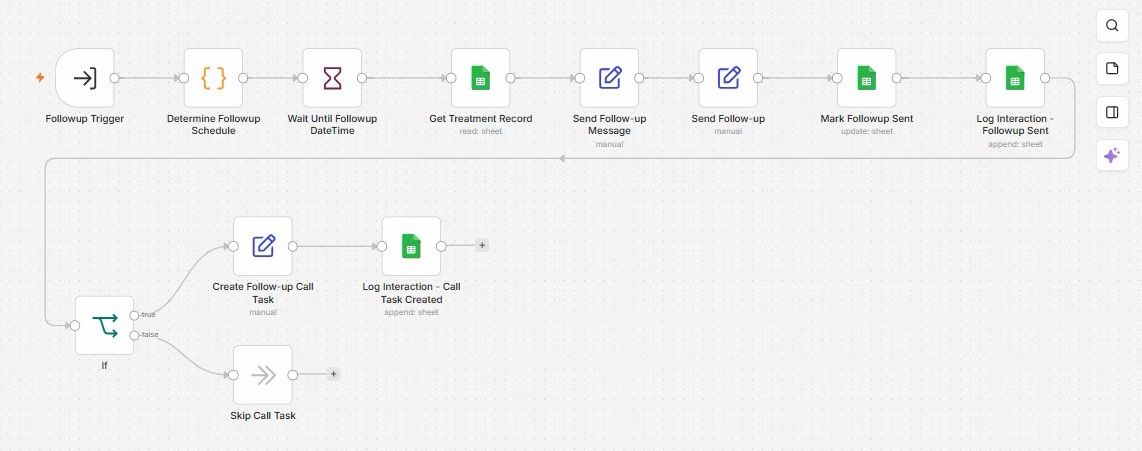 (opens full size in a new tab)
What is automated, and what people still do
Done automatically
- Checking booking details and flagging invalid bookings to staff
- Recognising returning patients and assigning patient numbers
- Saving appointments and treatment records
- Preparing reminders, feedback requests and follow-up messages
- Alerting staff about low ratings
- Recording every patient interaction
Still done by people
- Marking when a patient arrives and when treatment is complete
- Making the follow-up calls the system asks for
- Responding to low ratings and complaints
- All clinical decisions
Expected outcome
Every patient has one up-to-date record and gets reminders and follow-up on time, without staff having to remember each step.
No measured results yet, so no time savings or figures are claimed.
Technical details
For readers who want to know how it is built. You don't need this to understand the project.
Tools used
- n8n: runs the seven workflows and connects them
- Webhooks: receive bookings
- Schedule trigger: checks for reminders that are due
- Google Sheets: patients
- Sub-workflows: treatment completion starts feedback and follow-up
Show the full technical breakdown
Background
Seven connected n8n workflows built around the dental patient journey, from first enquiry and booking to treatment records, feedback, follow-up calls, complaints and staff alerts.
Industry: Dental care
Problem in detail: A dental clinic's admin work follows the patient: booking, identifying returning patients, reminders, recording treatment, asking for feedback, following up after specific treatments and handling complaints. Each step is small, but together they take a lot of staff time, and the ones that depend on someone remembering are the ones that get missed.
Before: Reception books appointments, searches for existing patients by hand, phones or messages patients before appointments, and records treatment separately. Feedback and post-treatment follow-up happen when someone has time. When an automation fails, nobody may notice.
Approach: Seven workflows, each responsible for one stage of the patient journey, sharing one patient and appointment record. Every patient gets a permanent MR (medical record) number on first contact, so later stages can find the right record. Reminders run on a schedule rather than holding a timer open for each booking. Completing a treatment starts the feedback and follow-up workflows automatically. Every interaction is logged.
Intended outcome in detail: Reception spends less time on lookups, reminders and follow-up messages, every patient has one consistent record, and nothing that matters to the patient depends on someone remembering to do it.
The 7 workflows
1. Lead capture, patient MR number and appointment booking
- Problem
- Reception has to check whether a caller is a new or returning patient before booking, and returning patients sometimes end up with duplicate records.
- Trigger
- A booking request sent to the New appointment webhook.
- Input
- Patient name, contact details, requested treatment, date and time.
- Output
- A patient record with an MR number, an appointment record, and a confirmation response.
- When something fails
- Invalid bookings never reach the patient sheet. They are logged with the reason and staff are told.
- Why it helps
- One record per patient from the very first booking, which every later stage relies on.
Steps
- Prepare and validate the appointment data.
- Read the patient sheet and look for an existing patient.
- Returning patient? Retrieve their MR number and update their details.
- New patient? Generate a new MR number and create their record.
- Create the appointment record.
- Build the confirmation message and respond to the booking request.
Decisions
- If the booking data is invalid: the error is formatted, logged to the errors sheet, staff are alerted and the request gets an invalid response.
- If the patient already exists: their existing MR number is reused.
- If the patient is new: a new MR number and patient record are created.
2. Appointment reminders
- Problem
- Reminder calls and messages take reception time, and missed reminders lead to missed appointments.
- Trigger
- A schedule trigger that runs at regular intervals.
- Input
- Appointments in the sheet that fall 24 hours or 2 hours ahead.
- Output
- Reminders marked as sent and a logged interaction for each.
- When something fails
- The sent flag stops a reminder going out twice on the next run.
- Why it helps
- Because each run reads the current sheet, a cancelled or moved appointment is picked up on the next run once the sheet is updated, without a timer waiting days for each booking.
Steps
- Read appointments due in 24 hours, and separately those due in 2 hours.
- Check whether each reminder should start.
- Build the reminder message.
- Send the reminder.
- Mark the reminder as sent in the appointment sheet.
- Log the interaction.
Decisions
- If a reminder is due and has not been sent: it is built
- If it is not due or has already been sent: nothing happens on this run.
The send steps are placeholders until a messaging provider is connected.
3. Treatment completion and dental record
- Problem
- What happens after treatment, such as the record update, feedback request and aftercare, depends on staff remembering each step.
- Trigger
- A treatment update sent to the webhook when a patient arrives or a treatment is completed.
- Input
- Appointment reference, action type and treatment details.
- Output
- An updated appointment, a treatment record, and two downstream workflows started.
- When something fails
- Unrecognised actions are rejected rather than written to the record.
- Why it helps
- Completing a treatment is the only manual step; feedback and follow-up start from it automatically.
Steps
- Prepare the treatment data.
- Route by action type.
- Arrived: mark the appointment as arrived, log it and respond.
- Completed: create the treatment record, mark the appointment completed and log it.
- Start the immediate feedback workflow and the follow-up workflow.
- Respond that the treatment was recorded.
Decisions
- If the patient has arrived: the appointment is marked arrived and logged.
- If treatment is complete: a treatment record is created, and modules 4 and 5 are started.
- If the action type is not recognised: the request gets an invalid action response.
4. Immediate feedback and rating
- Problem
- Feedback is rarely requested consistently, and an unhappy patient may leave a public review before the clinic hears about it.
- Trigger
- Started by module 3 after treatment; a separate webhook receives the patient's response.
- Input
- Patient and treatment details; later, the patient's rating.
- Output
- A logged feedback record and either a staff alert or a review request.
- When something fails
- Every branch writes to the interaction log, so it is clear which patients were asked, alerted or sent a link.
- Why it helps
- Unhappy patients reach staff first; satisfied patients are invited to leave a public review.
Steps
- Build and send the feedback request, then log it.
- When the patient responds, prepare the feedback data.
- Check whether the rating is low.
- Low rating: alert staff and log the alert.
- Good rating: send the Google review link and log it.
- Log the feedback and respond.
Decisions
- If the rating is low: staff are alerted so they can contact the patient.
- If the rating is good: the patient receives the Google review link.
The send and alert steps are placeholders until a messaging provider is connected.
5. Treatment-specific follow-up and call task
- Problem
- Different treatments need different aftercare, and some patients need a phone call rather than a message.
- Trigger
- Started by module 3 after treatment.
- Input
- Treatment record and patient details.
- Output
- A follow-up message, a logged interaction and, where needed, a call task for staff.
- When something fails
- The follow-up is marked as sent so it is not repeated.
- Why it helps
- Aftercare timing follows the treatment instead of depending on staff remembering it.
Steps
- Work out the follow-up date from the treatment.
- Wait until that date.
- Read the treatment record.
- Build and send the follow-up message.
- Mark the follow-up as sent and log it.
- Create a call task for staff if one is needed, and log it.
Decisions
- If the treatment needs a call: a follow-up call task is created and logged.
- If no call is needed: the call task is skipped.
The send step is a placeholder until a messaging provider is connected.
6. Complaints and voice-to-text
- Problem
- When a patient isn't satisfied, the complaint needs to reach the right person and be recorded accurately, including complaints left as voice messages.
This module is listed in the LinkedIn post but not shown in its screenshots. Its steps will be documented here once the workflow export is added.
7. Error handling and staff alerts
- Problem
- When an automation fails, nobody may notice until a patient misses a reminder or a booking disappears.
This module is listed in the LinkedIn post but not shown in its screenshots. Its steps will be documented here once the workflow export is added.
Checks and error handling
- Booking data is validated before any record is touched. Invalid bookings are logged to an errors sheet, staff are alerted, and the sender receives an "invalid" response.
- Existing patients are matched before a new record is created, so a returning patient keeps their MR number instead of getting a duplicate record.
- Each reminder is marked as sent, so the next scheduled check does not send it again.
- Treatment updates are routed by action type; anything unrecognised gets an "invalid action" response.
- Low ratings go to staff; good ratings receive a review link.
How this differs from version 1
My first dental automation handled appointment messages and feedback in three workflows. After discussing it with senior dental professionals, it became clear that it skipped questions a clinic has to answer every day: how do we know whether this is a returning patient? What happens after treatment? Who follows up, and when?
This version is organised around those questions. The main changes are:
- One record per patient. Every patient gets an MR number on first booking, and returning patients are matched instead of duplicated.
- Reminders on a schedule. Version 1 held a timer open for each booking. Here, a scheduled check reads the current appointments, so cancellations and changes are picked up on the next run.
- Treatment drives the rest. Marking a treatment as complete creates the dental record and starts the feedback and follow-up workflows.
- Feedback arrives separately. The rating comes in through its own webhook when the patient responds, rather than being evaluated in the same run as the request.
What is still open
Patient-facing messages are built but sent through placeholder steps, so connecting a messaging provider is the next step. Modules 6 and 7 are part of the design but are not yet documented here. The clinic website’s booking form was a frontend prototype at this stage and did not send bookings to the workflow.
Project status
Status: PrototypeBuilt in n8n and ready to be adapted for a business. Not yet in daily use.
Modules 1 to 5 are built in n8n, with Google Sheets as the patient and appointment record. Patient-facing messages are prepared but not yet sent through a messaging provider. Modules 6 and 7 are not shown in the published material yet. The clinic's website booking form was a frontend prototype at this stage and did not send bookings to the workflow.
Designed
- The seven-workflow architecture around the patient journey.
- The shared record structure in Google Sheets, with MR numbers linking each stage.
- The questions each stage answers, refined after discussion with senior dental professionals.
Built
- Module 1: booking intake with validation, patient matching, MR number generation and appointment creation.
- Module 2: scheduled 24-hour and 2-hour reminder checks with sent flags and logging.
- Module 3: treatment updates for arrivals and completions, starting modules 4 and 5.
- Module 4: feedback requests and rating-based routing.
- Module 5: treatment-specific follow-up with optional call tasks.
Tested
Nothing confirmed yet.
Not finished yet
- Patient-facing messages are prepared in placeholder steps; no messaging provider is connected yet.
- Modules 6 (complaints and voice-to-text) and 7 (error handling and staff alerts) are not documented in the published screenshots.
- The website booking form was a frontend prototype and did not send bookings to the workflow.
- No documented end-to-end test across all modules.
Needed before real use
- A messaging provider (for example, an approved WhatsApp Business account) for reminders, feedback and follow-ups.
- Patient consent for messaging, and handling of health information under the clinic's privacy obligations.
- A clinical records system or a secured database in place of Google Sheets.
- Authentication on every webhook.
- A booking form or practice-management integration that sends real bookings.
Original post
I first shared this project on LinkedIn on 5 October 2026. There is no public demo yet. Built for SmileCare Dental, the clinic scenario used across my dental automation projects. The second version of my dental automation, redesigned after discussing clinic workflows with senior dental professionals.
Related projects
- Appointment Reminders and Patient Feedback: version 1: the focused appointment and feedback system this project grew from.
- Social Media Publishing for a Dental Clinic: content automation for the same clinic scenario.
Want something similar?
Tell me about the task you would like to automate.