Missed appointments
Reminders depend on someone remembering
Confirmation calls and reminder messages are sent by hand. On a busy day they get skipped, and the appointment slot is lost.
Healthcare & Dental Automation
I help dental and healthcare clinics take repetitive admin off the front desk, from patient records and appointment reminders to feedback and aftercare, with automation built around how your clinic already works.
The problem
Small admin tasks add up. These are the ones that most often fall through the cracks.
Missed appointments
Confirmation calls and reminder messages are sent by hand. On a busy day they get skipped, and the appointment slot is lost.
Front-desk overload
Staff search for returning patients, retype details and sometimes create duplicate records instead of looking after the patients in front of them.
Lost feedback
Aftercare messages and feedback requests are sent when someone has time. An unhappy patient may go unnoticed until they leave a public review.
Solutions
Each system handles the repetitive steps and leaves decisions and conversations with your team.
Bookings and records
Reminders
Feedback
Aftercare
Clinic marketing
Reliability
Process
Four clear stages, so you always know what is happening and what comes next.
Understand how the process works today, who is involved and where the information lives.
Map the workflow, its decisions and what should happen when something goes wrong.
Build it and test both the normal path and the failure cases.
Document how it works, hand it over and adjust it based on real use.
Time calculator
Move the sliders to match your clinic. The estimate uses only the numbers you enter.
Your estimate
That is about 6.3 full working days every month spent on reminders and follow-up by hand.
At your rate, that costs about a month, or a year.
Calculated from your numbers only: appointments per week × minutes per appointment × 4.33 weeks. It shows the time spent today, not a guaranteed saving.
Discuss Your Clinic’s WorkflowCase studies
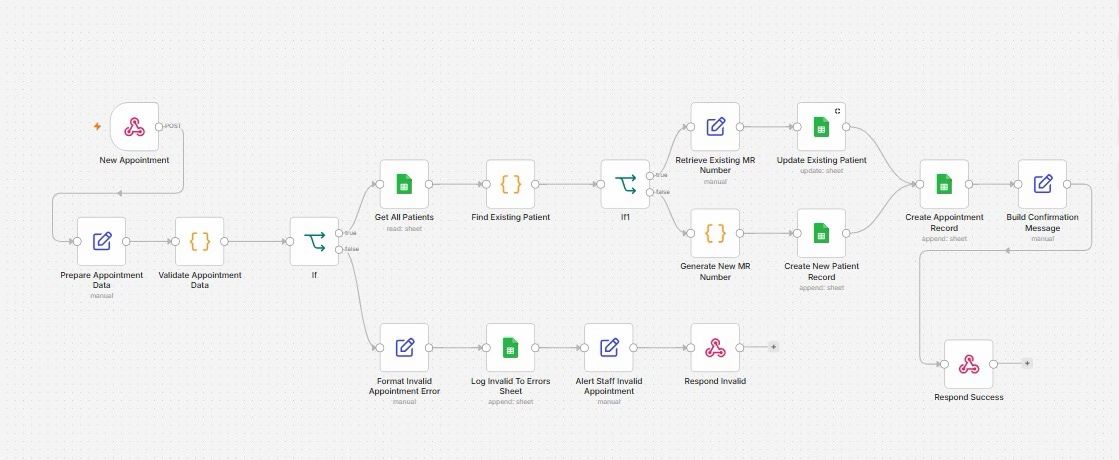
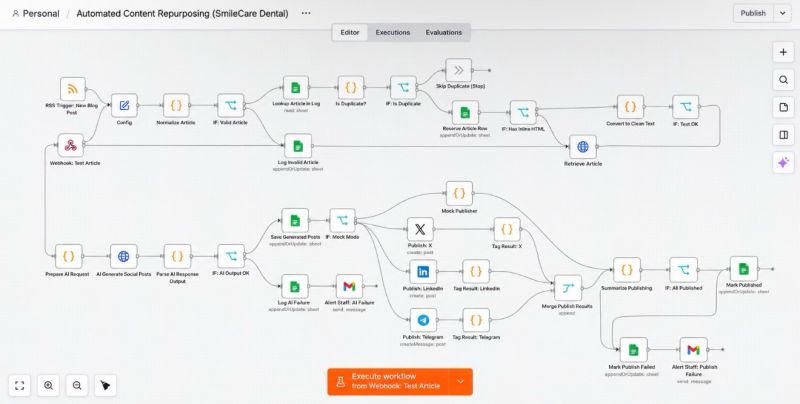
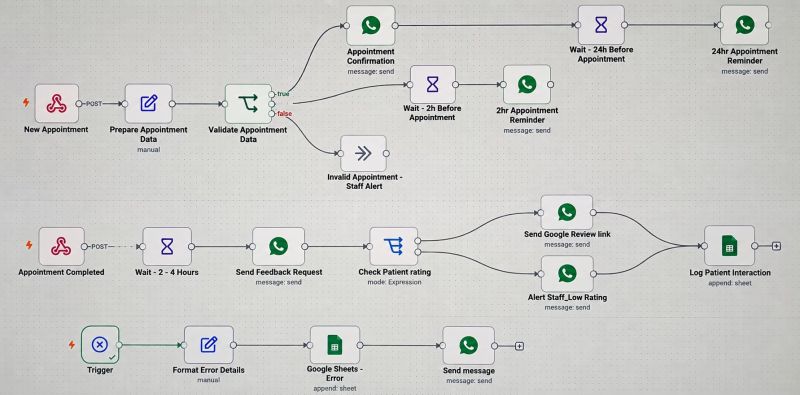
Choose a project to see its steps, the problem it solves and a real screenshot of the workflow.
Healthcare Automation
Booking, reminders, records, feedback and follow-up calls take up a lot of clinic staff time, and steps that rely on memory get missed.
Connected workflows follow each patient from first booking to aftercare, keeping one record per patient and preparing reminders and follow-ups on time.
Every patient has one up-to-date record and gets reminders and follow-up on time, without staff having to remember each step.
 (opens full size in a new tab)
Healthcare Automation
Each blog post has to be rewritten and posted by hand on every social platform, and failed posts can go unnoticed.
When an article is published, the system writes a post for each platform, publishes it and records what went out.
One article becomes posts for three platforms, with a record of every post and an alert if something fails.
 (opens full size in a new tab)
Healthcare Automation
Confirming appointments, sending reminders and asking for feedback take up reception time, and unhappy patients can go unnoticed.
Each appointment gets a WhatsApp confirmation and two reminders. Afterwards, the patient is asked for feedback and low ratings go to staff.
Every booking gets the same confirmation and reminders, and unhappy patients reach staff first.
 (opens full size in a new tab)
Privacy & security
Healthcare automation only works if patients and staff can trust it.
Consent
Reminders and follow-up messages are only sent to patients who have agreed to receive them.
Secure storage
Each workflow uses only the patient details it needs. For live patient data I recommend a secured database with limited staff access.
People in control
Automation handles routine messages and records. Clinical decisions and sensitive conversations stay with your staff.
Working together
Typical large agency
Working with me
“I focus on the admin that keeps a clinic running: bookings, reminders, records and follow-up. My goal is a system your team understands and trusts, not one they have to work around.”
Questions
No. I explain each workflow in plain language before it is built. Your team only needs to tell me how the work is done today.
No. It takes over repetitive steps like reminders, record updates and follow-up messages. Conversations with patients, clinical decisions and anything that needs judgement stay with your team.
Usually, yes. I build in n8n, which connects to tools such as Google Sheets, Gmail and WhatsApp. I start by checking which tools you rely on and whether they can be connected, so you don’t have to switch systems.
Patients must agree to receive messages, and personal and medical information has to be stored securely. The projects shown keep records in Google Sheets for simplicity; for live patient data I recommend a secured database.
Each workflow is built with error handling. Problems such as a missing detail or a failed message are logged, and staff or an administrator are alerted, so nothing fails silently.
My projects so far are for dental clinics. The same building blocks, such as bookings, reminders, feedback and follow-up, suit most appointment-based healthcare practices.
It depends on how many steps and tools a workflow involves. After we talk, I explain the scope in plain language before any work starts, so you know what you are agreeing to.
Send me a message on WhatsApp or through the contact form describing the task. I reply with how I would approach it, and we start with one small workflow.
Get started
Tell me how bookings, reminders and follow-ups work at your clinic today. I’ll explain what could be automated and what should stay with your team.
How bookings, reminders and follow-ups are handled today, and which tools your front desk uses.
A plain-English explanation of what the system would do automatically and what stays with your staff.
We begin with one useful workflow, such as appointment reminders, before building anything larger.