The problem
Confirming appointments, sending reminders and asking for feedback take up reception time, and unhappy patients can go unnoticed.
Who has this problem
Dental clinic reception teams.
How it works
- A new appointment is received and its details are checked.
- The patient gets a WhatsApp confirmation, then reminders 24 hours and 2 hours before.
- A few hours after the visit, the patient is asked for feedback.
- Satisfied patients get a Google review link. Low ratings are sent to staff.
- Every interaction is recorded, and the administrator is notified if the system has an error.
The real workflow
A screenshot of the workflow in n8n, the automation tool I build with, as shared on LinkedIn. Select it to open it full size.
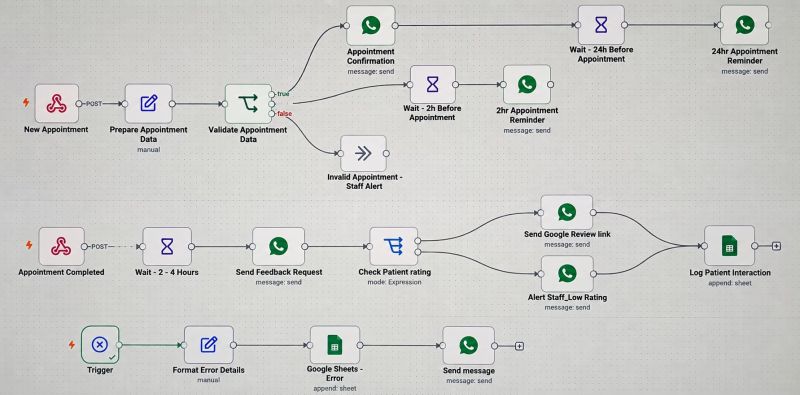 (opens full size in a new tab)
What is automated, and what people still do
Done automatically
- Confirmation and reminder messages
- Feedback requests after each visit
- Sending a Google review link to satisfied patients
- Alerting staff about low ratings
- Recording every patient interaction
- Notifying the administrator when something breaks
Still done by people
- Entering the appointment
- Contacting patients who gave a low rating
- Handling cancelled or rescheduled appointments, which this version doesn't do automatically
Expected outcome
Every booking gets the same confirmation and reminders, and unhappy patients reach staff first.
No measured results yet, so no time savings or figures are claimed.
Technical details
For readers who want to know how it is built. You don't need this to understand the project.
Tools used
- n8n: runs the three workflows
- Webhooks: receive new and completed appointments
- WhatsApp: confirmations
- Google Sheets: patient interaction log and error log
- Error trigger: catches failures in the other workflows
Show the full technical breakdown
Background
A focused n8n system for a dental clinic that confirms appointments, sends WhatsApp reminders, requests feedback, escalates low ratings to staff, logs every interaction and reports its own errors.
Industry: Dental care
Problem in detail: Dental clinics spend a lot of time confirming appointments, sending reminders, following up with patients and collecting feedback. The work is repetitive, it is easy to miss, and an unhappy patient may not be noticed until they leave a public review.
Before: Reception confirms each booking by hand, calls or messages patients before their appointment, and asks for feedback when they remember to. Interactions are not consistently recorded, so it is hard to know who was contacted and when.
Approach: Three n8n workflows. The first confirms each new appointment and sends reminders 24 hours and 2 hours before it. The second asks for feedback after the appointment, sends satisfied patients a Google review link and alerts staff about low ratings. The third catches errors from the other workflows, logs them and notifies an administrator.
Intended outcome in detail: Less time spent on confirmation calls and reminders, feedback collected after every appointment, and unhappy patients reaching staff before they reach a review site.
The 3 workflows
1. Appointment confirmation and reminders
- Trigger
- A new appointment sent to the webhook.
- Input
- Patient name, phone number, appointment date and time.
- Output
- A confirmation and two reminders on WhatsApp.
- When something fails
- Invalid appointments are routed to a staff alert. Errors in the run are picked up by the error workflow.
- Why it helps
- Every booking gets the same confirmation and reminders without reception sending them.
Steps
- Prepare the appointment data.
- Validate it.
- Send a WhatsApp confirmation.
- Wait until 24 hours before the appointment and send a reminder.
- Wait until 2 hours before the appointment and send a second reminder.
Decisions
- If the appointment data is valid: the confirmation is sent and both reminders are scheduled.
- If the data is invalid: staff are alerted instead.
2. Feedback, reviews and low-rating alerts
- Trigger
- A completed appointment sent to the webhook.
- Input
- Patient details and the appointment that was completed.
- Output
- A logged interaction and either a review request or a staff alert.
- When something fails
- Every outcome is logged, so it is clear which patients were contacted. Errors are passed to the error workflow.
- Why it helps
- Feedback is requested after every appointment, and problems reach staff first.
Steps
- Wait two to four hours after the appointment.
- Send a WhatsApp feedback request.
- Check the patient's rating.
- Send satisfied patients a Google review link.
- Alert staff about low ratings.
- Log the interaction in Google Sheets.
Decisions
- If the rating is good: the patient receives the Google review link.
- If the rating is low: staff receive an alert so they can follow up personally.
3. Error monitoring and admin notification
- Trigger
- n8n's error trigger, which runs when another workflow fails.
- Input
- The failed workflow, node and error message.
- Output
- A logged error and an admin notification.
- When something fails
- This workflow exists so that failures elsewhere are not silent.
- Why it helps
- Problems are reported as they happen instead of being found by a patient who never got a reminder.
Steps
- Format the error details.
- Append them to the error sheet.
- Send a WhatsApp notification to the administrator.
Checks and error handling
- Appointment data is validated before any message is sent. Invalid appointments go to a staff alert instead of the patient.
- The patient's rating decides the next step, so low ratings never receive a review request.
- A dedicated error workflow records failures in Google Sheets and notifies an administrator.
Scope compared with the connected workflows
This project covers the communication around one appointment: confirm it, remind the patient, ask how it went, and act on the answer. It does not identify returning patients, keep a treatment record or plan aftercare. Those are covered in the connected dental clinic workflows, which grew out of this version.
What I learned from the feedback on this version
People who reviewed the post raised two design questions that shaped the next version:
- Wait nodes and cancellations. Holding a wait open for each booking means a cancelled or rescheduled appointment can still receive its reminder. Version 2 replaces the waits with a scheduled check that reads the current appointment sheet.
- Silent send failures. If a single WhatsApp message fails, for example because a number has changed, the error workflow can log it, but the patient simply never gets the reminder. A production version needs per-message delivery tracking.
The rating check also runs in the same execution as the feedback request. In version 2, the patient’s response arrives through its own webhook.
Project status
Status: PrototypeBuilt in n8n and ready to be adapted for a business. Not yet in daily use.
Three workflows are built in n8n with WhatsApp message nodes and Google Sheets logging. End-to-end test runs with real messages have not been documented.
Designed
- Appointment confirmation and two-stage reminders.
- Feedback request with rating-based routing.
- A separate error-monitoring workflow.
Built
- Three n8n workflows with webhook and error triggers, Wait nodes, WhatsApp message nodes and Google Sheets logging.
Tested
Nothing confirmed yet.
Not finished yet
- Documented test runs with real WhatsApp messages.
- Handling for appointments that are cancelled or rescheduled after confirmation.
- Retrying or reporting an individual message that fails to send.
Needed before real use
- An approved WhatsApp Business account and message templates.
- Patient consent for messaging, and handling of health information under the clinic's privacy obligations.
- Authentication on the webhooks.
Original post
I first shared this project on LinkedIn on 26 September 2026. There is no public demo yet. Built for SmileCare Dental, the clinic scenario used across my dental automation projects. This was the first version; it was later expanded into the connected clinic workflows.
Related projects
- Patient Journey Automation for Dental Clinics: version 2: the seven-workflow patient journey this project grew into.
Want something similar?
Tell me about the task you would like to automate.