The problem
Each blog post has to be rewritten and posted by hand on every social platform, and failed posts can go unnoticed.
Who has this problem
Dental and healthcare clinics that publish blog articles and share them on social media.
How it works
- A new article appears on the blog.
- The system checks that the article is complete and hasn't been shared before.
- AI writes a post for each platform.
- The posts are published on LinkedIn, X and Telegram.
- Each result is recorded in a spreadsheet, and staff get an email if anything fails.
The real workflow
A screenshot of the workflow in n8n, the automation tool I build with, as shared on LinkedIn. Select it to open it full size.
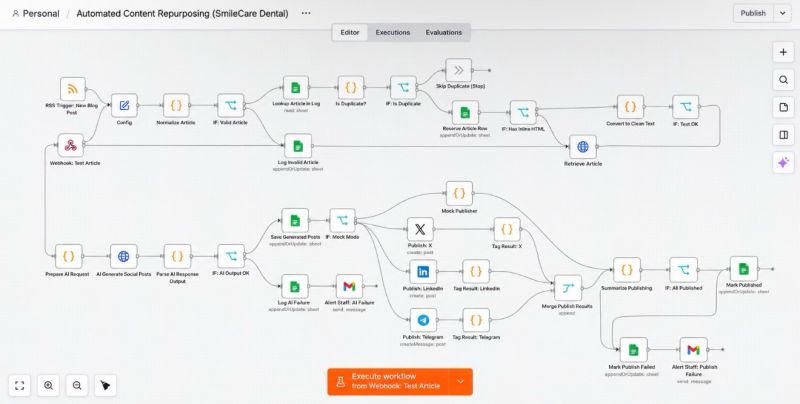 (opens full size in a new tab)
What is automated, and what people still do
Done automatically
- Spotting new articles
- Skipping articles that were already shared
- Writing the social media posts
- Publishing to all three platforms
- Recording the results and emailing staff about failures
Still done by people
- Writing the blog article
- Fixing a post when staff are told it failed
- Approving posts before they go out, if the business wants that step (not built yet)
Expected outcome
One article becomes posts for three platforms, with a record of every post and an alert if something fails.
No measured results yet, so no time savings or figures are claimed.
Technical details
For readers who want to know how it is built. You don't need this to understand the project.
Tools used
- n8n: runs the workflow and its branches
- RSS feed: detects new blog articles
- Webhook: accepts test articles on demand
- AI model (HTTP request): writes the social posts
- Google Sheets: article log
- LinkedIn: publishing
- X: publishing
- Telegram: publishing
- Gmail: failure alerts to staff
Show the full technical breakdown
Background
An n8n workflow that takes a new blog article through validation, duplicate checks and AI-generated social posts, publishes to LinkedIn, X and Telegram, and logs every result.
Industry: Dental care
Problem in detail: Writing an article is one task. Adapting it for every social platform is another, and it repeats with every post. When publishing is done by hand, nobody has a reliable record of what went out where, and a failed post is easy to miss.
Before: Someone copies the article, rewrites it for each platform, publishes it on LinkedIn, X and Telegram one at a time, and keeps track of what was posted in their head or a spreadsheet. If a post fails, it is only noticed if someone checks.
Approach: A single n8n workflow picks up new articles, rejects incomplete ones, stops duplicates before any AI call, asks an AI model for platform-specific posts, publishes them, and records the outcome in Google Sheets. When the AI step or a publishing step fails, staff receive an email instead of the failure going unnoticed.
Intended outcome in detail: One article in, three platform-ready posts out, with a written record of every run and a prompt alert when something needs attention. The aim is to remove the repetitive rewriting and posting, not the editorial judgement.
The 2 workflows
1. Intake and checks
Every article is normalised, validated and checked against the log before it reaches the AI step.
- Trigger
- A new item in the blog's RSS feed, or a test article sent to the webhook.
- Input
- Article title, link and content.
- Output
- Clean article text, ready for the AI step, with a reserved row in the log.
- When something fails
- Invalid articles are written to the log so they can be reviewed later.
- Why it helps
- The AI step only runs on new, complete articles.
Steps
- Receive the article from the RSS trigger or the test webhook.
- Apply the workflow configuration.
- Normalise the article into one consistent format, whichever trigger it came from.
- Check the article has the content it needs.
- Look the article up in the Google Sheets log.
- Stop if it has been processed before; otherwise reserve a log row for it.
- Use the article's own HTML if it is included; otherwise fetch the article page.
- Convert it to clean text and check the text is usable.
Decisions
- If the article is missing required content: it is logged as invalid and the run stops.
- If the article is already in the log: it is skipped as a duplicate.
- If the feed item has no inline content: the article page is fetched first.
Steps are based on the workflow screenshot in the LinkedIn post. Some helper steps are combined.
2. Generation, publishing and logging
The AI writes the posts, each platform is published separately, and the results are combined into one record.
- Trigger
- Clean article text from the intake stage.
- Input
- Article text and metadata.
- Output
- Posts live on three platforms and a complete row in the log.
- When something fails
- Two alert paths, one for AI failures and one for publishing failures, both sent through Gmail and both recorded in Google Sheets.
- Why it helps
- Failures are visible to staff the moment they happen, instead of being found days later.
Steps
- Build the AI request from the article text.
- Ask the AI model for social posts.
- Parse the response and check it contains usable posts.
- Save the generated posts to Google Sheets.
- Publish to X, LinkedIn and Telegram on separate branches.
- Merge the three results and summarise the run.
- Mark the article as published, or as failed with an email to staff.
Decisions
- If the AI response is missing or malformed: the failure is logged and staff get an email.
- If every platform publishes successfully: the log row is marked as published.
- If any platform fails: the row is marked as failed and staff get an email.
Steps are based on the workflow screenshot in the LinkedIn post. Small helper steps are left out.
Checks and error handling
- Articles missing required content are rejected and logged as invalid before anything else runs.
- Each article is looked up in the log sheet. Duplicates stop here, before any AI call or publishing step, so the same article is never posted twice and no AI usage is spent on it.
- New articles get a log row reserved straight away, so the article is on record before the slower steps run.
- The article text is cleaned and checked before it is sent to the AI model.
- The AI response is parsed and checked. If it is unusable, the failure is logged and staff get an email.
- Publishing results from all three platforms are merged and summarised. If any platform fails, the row is marked as failed and staff get an email.
Why the checks come first
The most expensive and visible steps in this workflow are the AI call and the publishing. Everything before them exists to make sure they only run when they should. An incomplete article is logged and dropped. An article that has been seen before stops at the duplicate check. A new article reserves its row in the log immediately, so it is on record before the AI and publishing steps run.
Two ways in, one path through
The RSS trigger is the normal entry point: a new item in the clinic’s blog feed starts a run. The webhook accepts a test article on demand, which makes it possible to try the whole workflow without publishing a real blog post first. Both feed into the same normalisation step, so everything after it handles one consistent format.
What staff see when something fails
Failures are split by cause. If the AI response cannot be used, staff receive an AI failure email and the article is logged as such. If the posts are generated but a platform rejects one, the run is marked as failed and staff receive a publishing failure email. In both cases the Google Sheets log shows what happened to every article.
Project status
Status: PrototypeBuilt in n8n and ready to be adapted for a business. Not yet in daily use.
The workflow is built in n8n with all publishing, logging and alert nodes in place. End-to-end test results across all three platforms have not been documented yet.
Designed
- Full workflow from article intake to publishing, logging and failure alerts.
- Separate failure paths for invalid articles, AI failures and publishing failures.
Built
- The workflow in n8n, including RSS and webhook triggers, Google Sheets logging, AI request, LinkedIn, X and Telegram publishing nodes, and Gmail alerts.
Tested
Nothing confirmed yet.
Not finished yet
- Documented end-to-end test runs for each platform.
- Retry behaviour when only one platform fails.
Needed before real use
- Connected business accounts for LinkedIn, X and Telegram with the right permissions.
- A human review step if posts must be approved before they go out.
- Monitoring of AI usage and cost.
Original post
I first shared this project on LinkedIn on 12 October 2026. There is no public demo yet. Built for SmileCare Dental, the clinic scenario used across my dental automation projects.
Related projects
- Patient Journey Automation for Dental Clinics: the patient-journey system built for the same clinic scenario.
Want something similar?
Tell me about the task you would like to automate.